How customer content helps your Shopify store rank on Google
 Social Place · 7 min read

On this page
- Why your customers’ words help you rank
- Five kinds of customer content, and what they do for Google
- Step 1: Collect what customers already write
- Step 2: Answer on your own pages, in their words
- Step 3: Ask for reviews and photos that say something
- Step 4: Give discussions a home on your domain
- Step 5: Keep it clean and real
- What to expect
- FAQ
Shoppers don’t search the way product pages are written. They type “are merino socks itchy” or “warm enough for a winter hike”. Your customers already write those exact phrases every day, in reviews, emails and comments. Here’s how this content, called user-generated content or UGC, helps your Shopify store on Google, which kinds count most, and how to collect more of it without faking anything.
To keep it concrete, we follow one example: a small brand of merino wool socks and base layers for hiking.
Why your customers’ words help you rank
Search engines try to match each search with the page that answers it best. Customer content helps in three ways:
- It uses the words people search with. Your page says “100% merino, 240 g/m²”. Your customers write “not itchy at all, even after a full day”. The second sentence is much closer to what a hesitant shopper types.
- It answers long, specific questions. “Do merino socks shrink in the dryer?” has fewer searches than “merino socks”, but far less competition, and the people who type it are close to buying.
- It shows real experience. Google’s quality guidelines look for first-hand experience in content. A review written after a week in the mountains, with a photo, shows exactly that.
There’s a reason so many shoppers add “reddit” at the end of their searches: they want answers from people who used the product, not from the brand. Google has been showing more forum discussions in its results for the same reason.
Five kinds of customer content, and what they do for Google
Not all customer content helps your own site. What matters is where it lives:
| Customer content | Where it lives | What it does for your store on Google |
|---|---|---|
| Product reviews | Your product pages | Your customers’ words on the page, and with a review app that supports it, star ratings that can appear in the results |
| Questions and answers | Product pages, a FAQ page, your forum | Pages that answer the exact questions shoppers type |
| Customer photos | Product pages, your forum | Real photos that can appear in image search, with a clear description |
| Discussions and tips | A forum on your store | Tips and experiences on your own domain, next to your products |
| Comments on Instagram, Discord or Facebook | Those platforms | Little or nothing: even when they show up on Google, the visit goes to the platform |
The last row is the trap. A brand can have a lively Facebook group and great Instagram comments, and none of it brings a visitor to its store from Google. We compare the options in Discord, Facebook group or a forum on your store?
Step 1: Collect what customers already write
You don’t need to invent topics. Go through a month of messages: your inbox, your reviews, the comments under your Instagram posts, your chat. Copy every question and every striking sentence the way the customer wrote it, without names or order details.
For our sock brand, the same questions kept coming back: “Are they itchy?”, “Do they shrink?”, “Warm enough for snow?”, “Do they smell after three days?”. Those are four searches people make every day.
Step 2: Answer on your own pages, in their words
Once you have your list, give each question one answer, in one place on your store. The right place depends on the kind of question:
| Kind of question | Example | Where to answer it |
|---|---|---|
| Before buying | “Are merino socks itchy?” | On the product page, in a short questions section at the end of the description |
| How to | “How do I wash them without shrinking them?” | In a guide: one page or blog article per question |
| Experience | “Warm enough for a winter hike?” | In your forum, where customers tell what it was like for them |
Here’s what the first question became, at the end of the sock’s product page:
Are merino socks itchy?
No. Merino fibers are much finer than regular wool, so they feel soft on the skin, even after a full day of walking.
“I wore them four days in a row on the trail, not a single itch.” Marie, a customer
- Use the customer’s question as the heading, word for word.
- Answer in the first line, then add a detail, a photo or a customer’s words, with their consent.
- Link the pages together: the product page to the care guide, the guide back to the product.
Answering each question once, in public, also saves your team from writing the same email ten times. We cover that side in how to stop answering the same customer questions.
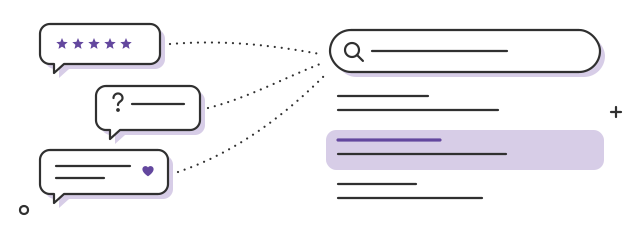
- Your customers’ wordsquestions, reviews, tips
- The searches they matchon your own pages
Step 3: Ask for reviews and photos that say something
“Great product, 5 stars” helps nobody, Google included. A review that mentions the trail, the weather and the size helps the next shopper and matches more searches. Ask better questions:
- In the review request, ask something specific: “Where did you wear them first?”, “How was the size compared to your usual one?”.
- Ask for a photo in context: on the trail, in the tent, drying on a backpack. A product on a real foot says more than a studio shot.
- Reply to reviews, the good ones and the others. Your answer adds useful information and shows a brand that listens.
When you reuse a customer photo on a product page, give it a clear description (the alt text): “Grey merino hiking socks in muddy boots”, rather than “IMG_2041”. More ideas in how to get customers to share photos of your products.
Step 4: Give discussions a home on your domain
Reviews come once, after a purchase. Discussions keep going: tips between hikers, gear lists, photos from a weekend, questions before a first trip. Where they happen decides who benefits.
- On Discord, in a Facebook group or in Instagram comments, the conversation belongs to the platform. The visits it brings, if any, go there.
- In a forum on your store, the conversation sits on your own domain, next to your products, and your customers sign in with the account they already have.
With Social Place, the forum lives on your Shopify store, its discussions can be found on Google, and every question asked there shows you, week after week, what your customers want to know. That list feeds your product pages and your guides, which brings us back to step 2. Setting it up takes no code: see how to add a forum to your Shopify store.

- A question in the forumin the customer’s words
- Your answer on the product pagewritten by you, for every shopper
A forum only produces content if people take part, of course. If yours is still quiet, start with how to bring a quiet store community back to life, and plan your first posts with our community post ideas.
Step 5: Keep it clean and real
Customer content helps only when it’s useful and real. Two rules:
- Remove spam quickly. Google’s spam policies cover user-generated spam: off-topic posts stuffed with links can hurt the whole site. Moderate, and delete them as soon as they appear.
- Never fake it. No invented reviews, no questions written as if a customer had asked them, no fake members. Fake reviews are illegal in many countries (the US Federal Trade Commission banned them in 2024) and against Google’s policies. You can publish the questions you really receive, from your team’s account, as questions you get.
Correct wrong answers too, kindly. An outdated tip on your own domain misleads every shopper who finds it.
What to expect
SEO is slow. Count in months before new pages bring steady visits, and no method guarantees rankings. To follow progress, connect your store to Google Search Console: its Performance report lists the searches your pages appear for. Watch the long questions: when “do merino socks shrink” starts bringing visits, you know the method works.
The good news: this content keeps working. An answer written this year still helps the shopper who asks the same question in two years. And the customers who write it are the ones who come back, as we explain in how to build an online community for your Shopify store.
FAQ
Does user-generated content help SEO?
Yes, when it lives on your own site and is useful. Reviews, questions and discussions use the words shoppers search with, answer long specific questions and show real experience, which Google’s quality guidelines look for.
Do product reviews help SEO on Shopify?
They add your customers’ words to your product pages, and with a review app that supports it, star ratings can appear in the results. Ask for reviews that say something specific: where, how, which size.
Do Instagram comments or a Facebook group help my store’s SEO?
Very little. That content lives on those platforms, so even when it shows up on Google, the visit goes there and not to your store.
Can I write reviews or questions myself?
No fake reviews and no questions written as if a customer had asked them: it’s illegal in many countries and against Google’s policies. You can publish the questions you really receive, from your team’s account, as questions you get.
How long does it take to see results?
Count in months. Follow the searches your pages appear for in Google Search Console, and watch the long questions first.